Zero to Ready Output Pattern: Creating Production-Ready Textile Patterns from Scratch with AIT AI Tools
Although the use of artificial intelligence in textile design is rapidly becoming widespread, general-purpose image generation tools often fall short of meeting the real needs of the production line. Creating a visually appealing pattern is not enough on its own. The pattern must be compatible with repeat structures, avoid errors at edge connections, be ready for color separation, work in high resolution, and integrate directly into the printing process.
Many designers, brands, and manufacturers still have to spend long hours manually correcting images generated by general AI tools. Edge transitions may break, pattern repeats may contain visible errors, color layers may not be separated in a production-friendly way, and the file may need to go through a serious cleanup process in Photoshop or similar software before it can be sent to a printing machine.
This is exactly where AIT AI Tools focuses: not merely generating images, but transforming a raw idea or an existing visual into a production-ready textile pattern.
Why General AI Image Generation Is Not Enough for Textile Production
General AI tools mostly focus on producing an aesthetic image. However, in the textile industry, technical accuracy is just as important as aesthetics. A pattern may look beautiful on a screen, but once applied to fabric, repeat errors, seamless transition issues, color shifts, or resolution problems may appear.
In textile production, a pattern being “beautiful” is not enough. It must also be ready for printing, repeat systems, color separation, surface application, and client presentation. That is why production-oriented textile design requires much more than a classic text-to-image approach.
At this point, the real need is much broader than generating a single image. The user must be able to transform an idea into a proper pattern structure, edit that pattern, create its repeat, increase its resolution, prepare color separation, and finally present it as applied to a product. AIT AI Tools answers this need with an AI ecosystem specialized for the textile industry.
What Is Zero to Ready Output Pattern?
Zero to Ready Output Pattern refers to the transformation of a pattern idea from the zero point into a production-ready output.
This process does not simply mean writing a prompt and receiving an image. On the contrary, it describes a workflow where ideation, pattern generation, pattern extraction, editing, repeat creation, resolution enhancement, color separation, vector output, mockup preparation, and presentation all progress within a single flow.
The important point here is this: not every user starts the process from the same place. Some users want to create a completely new pattern from scratch. Others start from a fabric photograph, a customer sample, an old collection visual, or a pattern applied on a product. That is why the correct usage flow of AIT AI Tools covers both creation from scratch and obtaining a production-ready pattern from an existing visual.
With this approach, a designer or manufacturer can transform a raw idea or an existing visual into a print-ready, professional, and technically usable pattern file in a short time.
The Correct Usage Order with AIT AI Tools
The strongest side of AIT AI Tools is not only that the tools work as separate features, but that they create an end-to-end production workflow when used in the correct order. This workflow may change depending on the user’s starting point, but the general logic remains the same: first the source is defined, then the pattern is developed, repeated, prepared for technical quality, and finally converted into a presentation.
The correct usage order can generally be considered as follows:
- Defining the starting source: Creating from scratch with a prompt or moodboard, or extracting a pattern from an existing visual.
- Pattern generation and editing: Creating the first pattern structure, generating variations, and editing motifs when needed.
- Repeat and seamless repeat preparation: Bringing the pattern into a structure that can continue endlessly on fabric.
- Resolution and print quality: Increasing the pattern to high-resolution production quality.
- Color separation and technical file preparation: Preparing production-ready outputs such as color layers, TIFF, Photoshop, or SVG files.
- Mockup and product visualization: Showing the pattern on garments, models, or home textile surfaces.
- Archiving and B2B presentation: Storing final patterns according to collection structure and preparing them for professional presentation.
This order shows not only “what the tools do,” but also at which stage they should be used more correctly. Because in textile production, progressing in the wrong order may require going back to the beginning at the end of the process. For example, increasing the resolution of a pattern that has not yet been repeated, or performing color separation on it, may create the need for additional technical corrections later. Therefore, in production-oriented workflows, using the tools in the correct order reduces time loss and provides a more controlled output.
Starting Point: Creating from Scratch or Extracting a Pattern from an Existing Visual
The production process with AIT AI Tools can have two different starting scenarios.
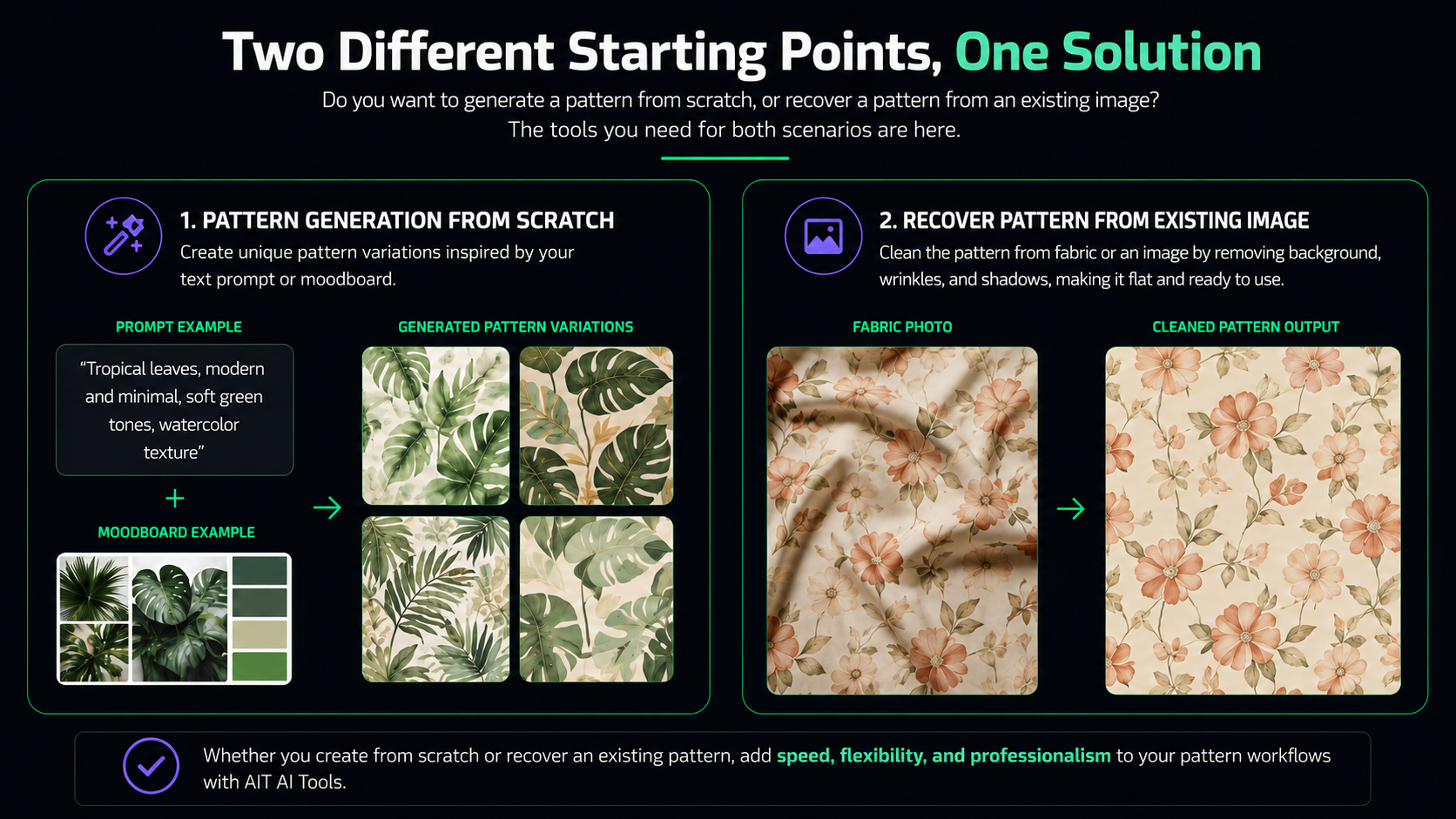
In the first scenario, the user wants to create a completely new pattern from scratch. In this case, the starting point may be written prompts, seasonal themes, color directions, collection language, or a moodboard approach. The user gives the system a creative direction by defining the desired atmosphere, color family, motif density, or application area of the pattern.
At this stage, Text-to-Pattern and Imagine come into play. With these tools, pattern families can be created through color-sensitive directions. The purpose here is not merely to generate a single image, but to obtain variations that fit the brand’s design language, collection unity, and production needs.
In the second scenario, instead of creating from scratch, the user starts from an existing visual. This visual may be a fabric photograph, a sample sent by a customer, a pattern applied on a product, a visual taken from an old collection archive, or a wrinkled/perspective-distorted surface photograph.
In this case, the first step of the process becomes Pattern Extractor. Pattern Extractor aims to recover pattern information from these types of visuals. By normalizing perspective distortions, wrinkles, and surface effects, it accelerates the process of creating a cleaner, repeatable, and production-preparable pattern output.
This feature is especially valuable for teams that want to digitize old collections, reorganize samples sent by customers, or extract production-ready patterns from physical examples.
Pattern Editing and Variation Generation
After the initial output is created, the process does not go directly to the final file. The first pattern often needs to pass through a development, editing, and variation stage. This is the stage where the aesthetic decisions of the design are made.
Here, the user can change motif density, make the composition more balanced, revise the color structure, regenerate specific areas, or create different variations from the existing pattern language. The goal is to clarify the visual identity of the pattern before it goes into production.
At this stage, tools such as Pattern Editor, Style Transfer, Inpainting, and Expand play a supporting role. Pattern Editor can be used to make adjustments on the pattern. Style Transfer can transfer a specific visual style to another pattern. Inpainting can change specific areas of the pattern with the help of a prompt. Expand can be used to enlarge or continue the composition area of the pattern.
This section enables conscious design decisions on the pattern instead of simply using the first generated image. Because in professional textile production, what matters is not only creating a visual, but refining that visual according to the collection, product group, and production needs.
Repeat and Seamless Continuity: A Production-Ready Structure with AIT Repeater
For a pattern to truly enter textile production, it must have a seamless repeat structure. The ability of the pattern to continue endlessly across fabric, the absence of visible breaks at edge connections, and the correct functioning of repeat ratios are critically important.
That is why, in the correct usage order, repeat and seamless repeat preparation comes after the pattern editing stage. Because creating a repeat before the aesthetic structure of the pattern is clarified may create the need for further editing later. Likewise, moving into technical production files before the repeat structure is prepared can cause problems during the printing stage.
AIT Repeater aims to create invisible joins by automatically repairing the edge transitions of the pattern. This allows the designer to move the pattern into a repeatable structure faster without having to align edges pixel by pixel in traditional programs.
The ability to control horizontal and vertical repeat ratios allows the pattern to be used more evenly across both apparel fabrics and wide surfaces such as home textiles. For example, smaller and more rhythmic repeats may be preferred for dress fabrics, while different repeat balances may be needed for curtains, duvet covers, upholstery, or bedspreads.
The purpose of this stage is not only to make the pattern look good in a single tile, but also to preserve its integrity when it continues across a fabric surface.
Resolution up to 15,000 px: AI Image Upscaler
After the repeat structure is prepared, the pattern must be brought to a resolution suitable for print quality. In digital textile printing, resolution quality directly affects the production result. Low-resolution, blurry, or pixelated patterns can cause quality loss during printing. This problem becomes even more noticeable in fine lines, small motifs, and detailed compositions.
For this reason, the resolution enhancement stage should come after the repeat stage in the correct usage order. First, the repeat structure and edge connections of the pattern are made correct, and then this technically established structure is increased to high resolution. In this way, instead of enlarging a problematic pattern, a pattern that has been made more suitable for production is carried to a higher-quality output level.
AIT AI Image Upscaler aims to enhance patterns up to 15,000 px and make them suitable for production quality. The important point here is not simply enlarging the image. It is to obtain a cleaner output while preserving the line quality, transitions, and overall repeat structure of the pattern.
As a result, the design approaches a technical quality that can be used not only on a digital screen, but also in large-scale fabric printing. Especially in digital print centers, large surface applications, and highly detailed patterns, this stage plays a critical role in determining the final quality.
Color Separation, Vector Output, and Production Preparation
In textile production, color control is at least as important as the pattern itself. Especially in professional printing processes, colors must be separated into layers, remain editable, and be delivered in file formats suitable for production.
This stage comes after the resolution and repeat structure are ready in the correct usage order. Because the file that will undergo color separation should be as close to the final pattern as possible. Performing color separation on a file whose repeat structure is not yet clear or whose resolution is insufficient can create the need for additional technical revisions later.
AIT AI Color Separation can separate complex patterns into up to 32 editable color layers. The purpose of this process is to make colors more controllable during the production stage and to create print-ready TIFF or Photoshop files.
In addition, Vectorizer can convert pixel-based patterns into scalable vector outputs such as SVG. This provides a strong advantage especially for large surface printing, technical adjustments, archiving processes, and different production scenarios.
At this point, the pattern is no longer only a visual output; it becomes a technical file that the production team can work with. In other words, one of the most important ways AIT AI Tools differs from “image generation” becomes visible here: the output is not only viewable, but usable in the production process.
Pre-Print Presentation with 2D and 3D Mockups
Seeing how a pattern will look on different surfaces before production provides a major advantage for both the designer and the customer. Producing a physical sample can be costly and time-consuming. Therefore, the digital mockup process accelerates the decision-making stage.
In the correct usage flow, the mockup stage comes after the technical pattern file is created. Because the pattern shown on the product should be as close to the final version as possible. If the repeat, resolution, or color structure of the pattern is not yet clear, decisions made on the mockup may be misleading.
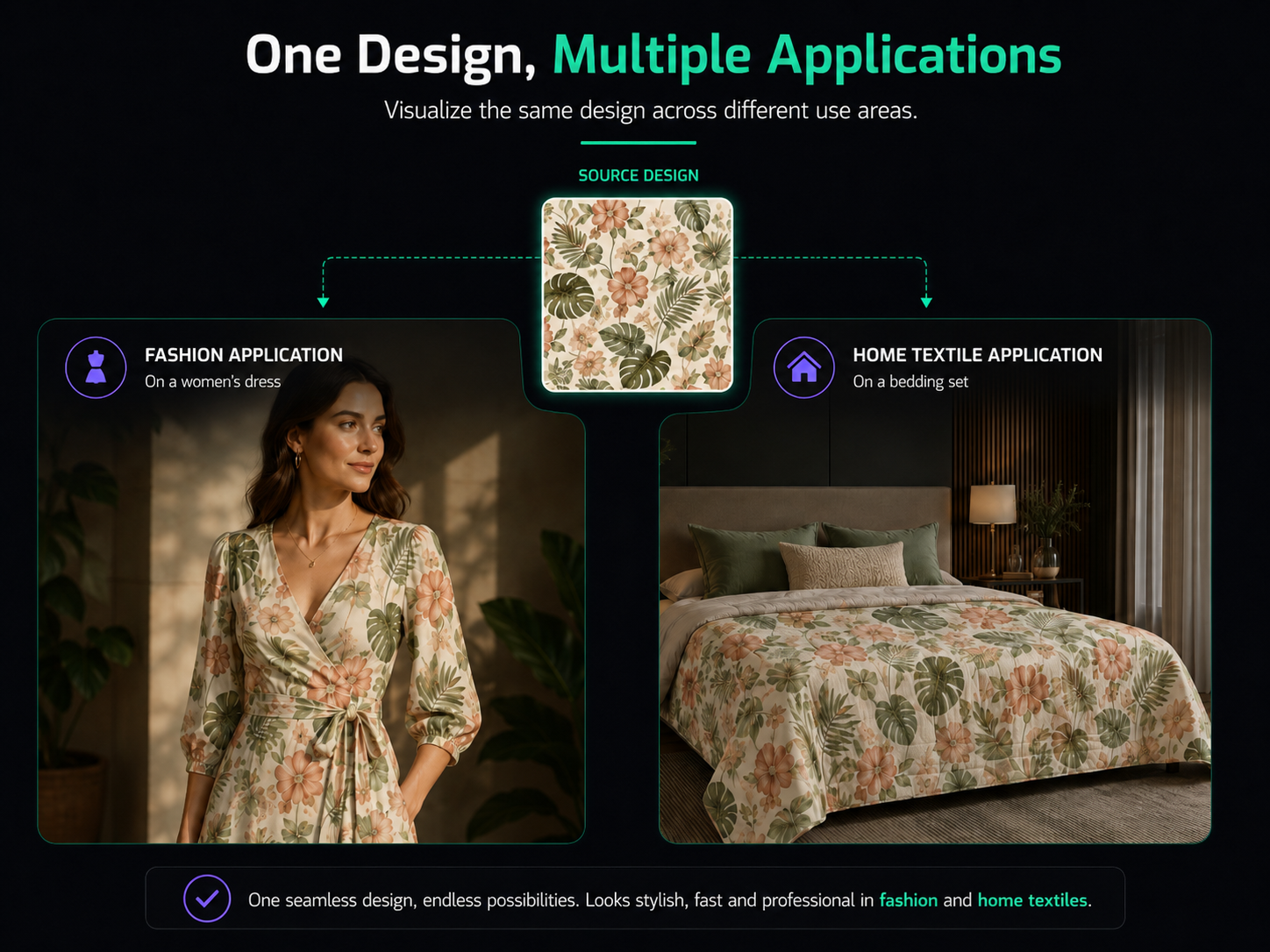
The 2D Wear Design, 3D Wear Design, and AI Mockup Studio tools within AIT AI Tools allow patterns to be visualized on garments, models, or home textile surfaces. This makes it possible to see more clearly how the pattern will look not only as a flat file, but also in a real usage scenario.
This stage is especially important in B2B client presentations, collection approvals, and product development processes. Instead of looking only at a flat pattern file, the customer can evaluate how the pattern will appear on a dress, shirt, bedspread, sofa, curtain, or different textile surfaces.
Design Archive and B2B Presentation Process with Archivist
For large textile teams, producing patterns alone is not enough. Thousands of patterns need to be stored in an organized way, categorized, prepared for customer presentations, and quickly found when needed.
In the correct usage order, the archiving and presentation stage comes last. Because at this stage, the patterns have largely become final. Production files, mockup visuals, collection variations, and customer presentations can be organized within a specific system.
Archivist helps manage design archives in a smarter way. With features such as dynamic tagging, collection filtering, and CAD presentation catalogs, it offers a more professional process for B2B customer meetings.
In this way, teams can work more systematically not only in production, but also in sales, presentation, and archive management. This stage provides operational efficiency especially for export-oriented textile manufacturers, design teams working with large collections, and companies managing customer-based pattern archives.
Why Is This Order Important?
The tools inside AIT AI Tools each provide powerful features on their own. However, the real efficiency emerges when these tools are used in the correct order. Because in textile production, each stage determines the quality of the next stage.
If the correct source is not selected at the beginning, the pattern editing stage becomes inefficient. If repeat creation is done before the pattern is sufficiently edited, the repeat structure may break later. If resolution is increased before the repeat is completed, faulty joins become high-resolution faulty joins. If color separation is performed before the resolution and repeat structure are clear, the production file may require additional revisions. If the mockup stage is reached too early, the customer may make a decision based on a design that is not yet final.
For this reason, the correct order is not only a practical recommendation; it is a professional workflow that protects production quality.
The structure offered by AIT AI Tools makes this process more understandable within a single ecosystem. The user can manage the entire process more deliberately, from generating an idea from scratch to transforming an existing visual, from pattern editing to repeat creation, from resolution enhancement to color separation, and from mockup to archiving.
From a 48-Hour Process to Ready Output in Minutes
According to AIT Analytics, more than 2,750 active users have been able to reduce the traditional design-to-production preparation process from 48 hours to approximately 14 minutes with these tools. This claim clearly reveals the core value proposition of AIT AI Tools: combining creativity with the technical production process.
The real difference here is that artificial intelligence is used not only to generate ideas, but also to respond to the real operational needs of the textile industry.
AIT AI Tools offers independent designers, creative studios, digital printing centers, and large textile manufacturers a faster, more controlled, and more professional workflow from idea to production.
This value should not be understood only through speed. The main advantage is reducing uncertainty in the production process and providing the designer with a more systematic working structure. Tools used in the correct order make the design more producible, more editable, and more presentable at every stage.
Conclusion: Do Not Just Generate Patterns, Create Production-Ready Outputs
The real value of artificial intelligence in the textile industry does not come only from generating beautiful visuals, but from making those visuals suitable for the production process.
AIT AI Tools offers a holistic structure that extends from prompt to pattern, from existing visual to producible output, from repeat to resolution, from color separation to mockup, and from archive to CAD presentation. In this way, the design process becomes not only creative, but also technically applicable.
An idea starting from scratch or an existing pattern visual can turn into a production-ready textile pattern in minutes with the correct tool order.
For this reason, AIT AI Tools should be considered not merely an AI image generation tool, but a professional end-to-end production ecosystem built for the textile industry.